The pager shouldn't be what starts the investigation
Authored by Greg Janco, Engineering Manager at Mezmo
I've always thought there was something backwards about incident response.
An alert fires at 3 a.m. PagerDuty does its job. Somebody wakes up, grabs a laptop, connects to the VPN, opens the alert, and then starts answering the same basic questions we ask at the beginning of almost every incident. What changed? What else is broken? Have we seen this before?
Some of those need a human eventually. A lot of the first pass doesn't.
The system already has the telemetry. It already knows what condition fired. In a lot of cases we already know which sources we would go inspect next. So why are we waiting for a human to wake up before any of that starts?
That's the part we've been working on with AI Investigations in Mezmo.
When an alert fires, AURA can start investigating right away. By the time I get to the incident, I want something waiting for me....evidence, what AURA thinks is happening, and enough of its work that I can decide whether I agree. Not a chatbot sitting there waiting for me to type a question. An investigation already underway.
Let the alert start the work
AI Investigations starts from a Mezmo Pipeline node alert.
You configure the alert like you normally would, but instead of only sending the result somewhere, you pick Mezmo AURA Investigation as the notification service. When the condition fires, AURA starts investigating.
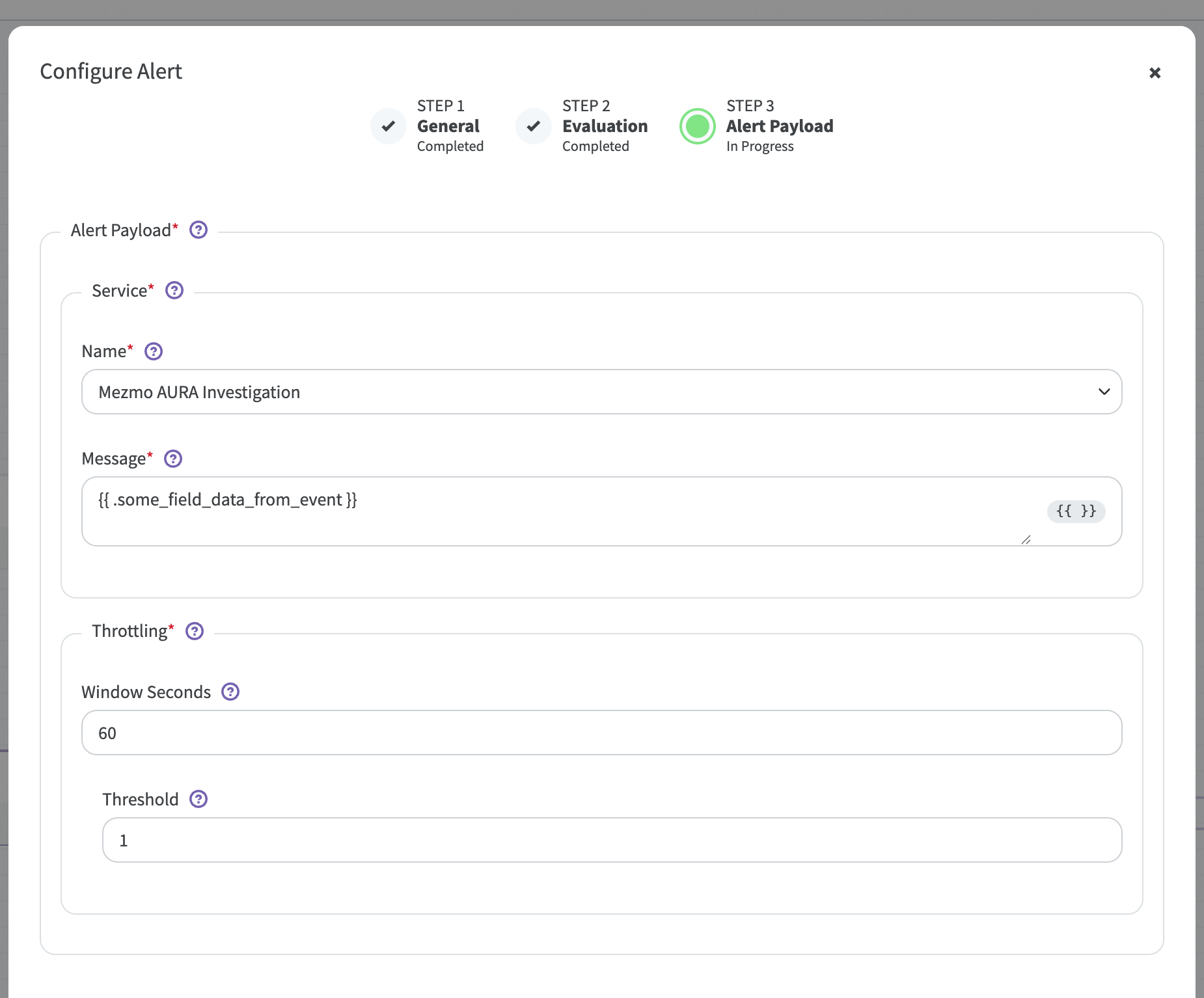
That's the part I care about. The alert isn't only telling me something happened. It's kicking off the first round of work.
And AURA isn't starting from "something is broken, figure it out." The investigation already has the context around the alert that fired and the data path it came from, which gives it somewhere useful to start.
I don't want to wait for the final answer
There are three states: Triggered, Investigating, and Completed. The names are pretty self-explanatory.
The interesting one is Investigating, because the record updates while AURA is working.
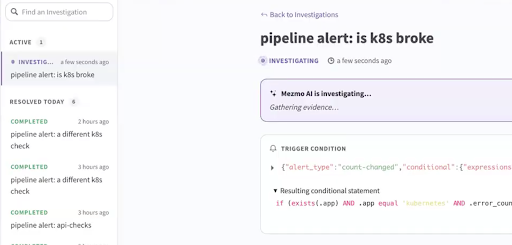
So if I get to my laptop four minutes after the alert fired, I don't have to sit there watching a spinner. I can read what it has already found. Maybe it's heading in the right direction and I let it keep going. Maybe I see something that changes my own hypothesis. Maybe I take over.
I mean, that's how I want an agent to behave during an incident. I don't want to hand it the problem, walk away, and wait for a magic answer. I want to inspect what it's doing while it's doing it.
Show me the work
When an investigation completes, the record includes:
- The alert and trigger source
- The evidence AURA evaluated
- The trigger conditions
- A confidence score
- The root cause
- A suggested resolution and remediation steps
- A timeline of events
- Related investigations
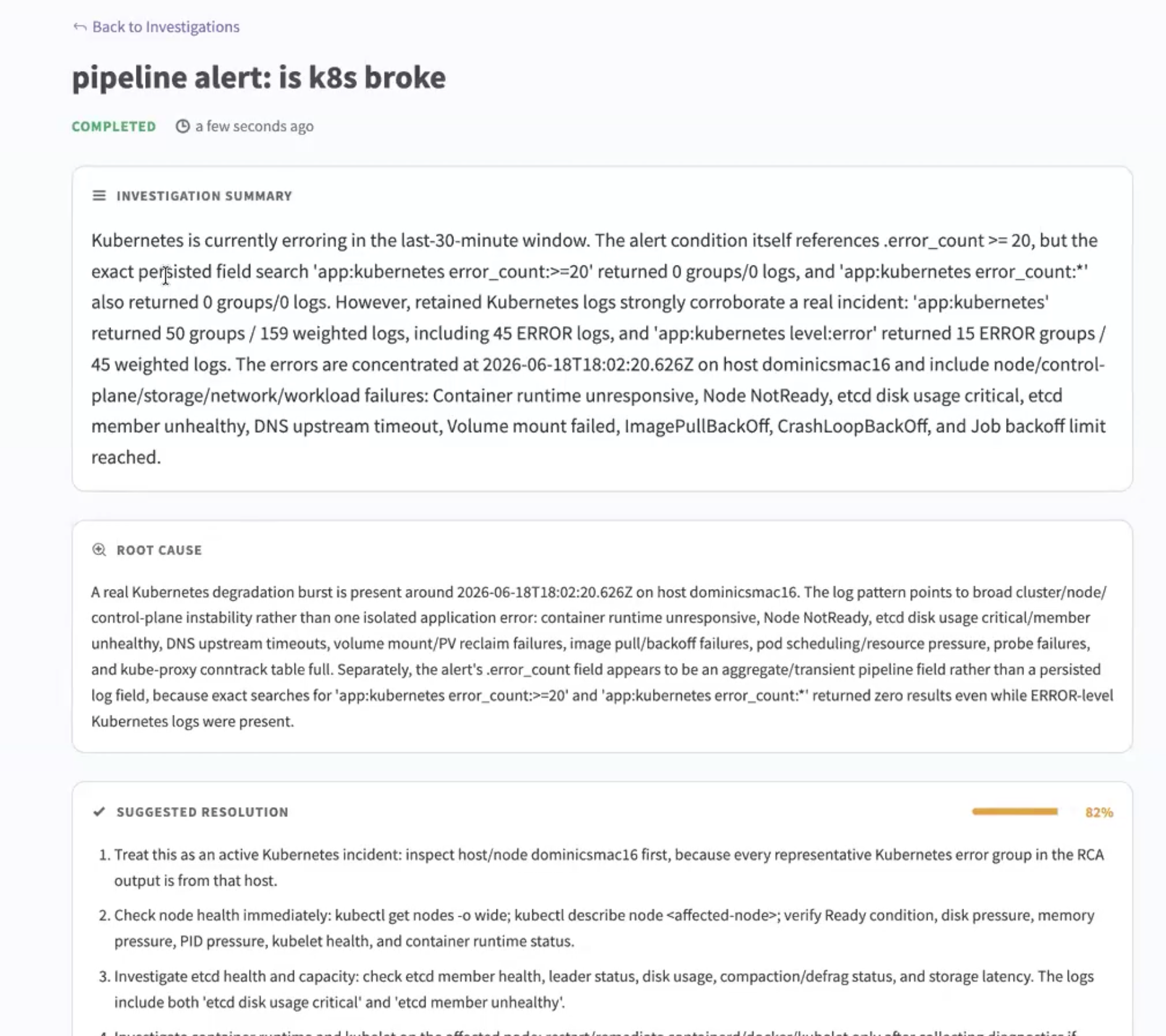
The root cause is useful. The suggested fix is useful. But in a real incident those aren't the first things I'm going to trust.
I want the evidence. If an agent tells me the cart service caused an outage, my next question is obvious: why do you think that? What did you observe, and what did you rule out?
That's why I like having the conclusion and the record sitting together. I'm not being asked to trust an AI-generated answer because it sounds reasonable. I can go look at what led to it.
And the result is still a suggested resolution. The investigation isn't changing production underneath me. I get the analysis, I decide what happens next.
The second incident is where this gets interesting
One investigation is useful. What I'm more interested in is what happens once you've got a pile of them.
Investigations can link to related investigations. So the incident waking me up tonight doesn't have to sit in isolation from the one we saw two weeks ago. Maybe we already investigated this failure, or the symptoms are a little different but the evidence looks familiar, or the previous investigation already ruled out three things I was about to go check again.
Anyone who has been on call long enough has had this conversation: "didn't we see something like this last month?" And then everybody goes digging through Slack, old tickets, dashboards, and somebody's memory trying to reconstruct what happened.
I'd rather have the previous investigation attached to the current one.
The first investigation saves you some work. The history is what keeps you from doing the same work over and over.
I also don't want another tab
There's a dedicated AI Investigations view in Mezmo, and it's useful when I want to browse what's active or go back and read something that completed. But most of the time I don't want another UI in my incident workflow. I want the information where I'm already working.
The Mezmo MCP server exposes two read-only investigation tools, list_ai_investigations and get_ai_investigation, so I can pull an existing investigation into another MCP-connected tool or assistant. If I'm already in my terminal or my IDE, I can ask for it there. If I'm fixing something from last night's incident, I can bring the completed investigation into the same place I'm writing the fix.
Read-only was a deliberate call on our side. When we talked about making these endpoints public, that was the line....let agents and people read the record, don't let them quietly start changing things through a side door. So the tools read investigations that already exist. They don't create them and they don't touch production.
Start with the boring stuff
If I were turning this on for the first time, I wouldn't point every alert at it on day one. I'd start with the boring incident.
You know the one. The alert where every experienced person on the team basically runs the same checklist: check the deployment, look at these logs, check this dashboard, compare against the last release, see whether the dependency is healthy.
That's a good place to start because you already know what a competent investigation looks like. Let AURA do that first pass, then go look at what it produced. Did it gather the evidence you would have gathered? Did it miss something? Did it save you ten minutes of mechanical work?
That'll tell you a lot more than turning it loose on every alert and hoping.
The human is still on call
None of this means the human goes away. Somebody still owns the incident. Somebody still evaluates the evidence. Somebody still decides what changes in production.
What I want to change is where that person starts.
I don't want the investigation to begin when I finally get my laptop open. I want it to begin when the system knows there's a problem. So when I show up, instead of starting with "okay, what's going on?" I can start with "here's what we've found so far, does it make sense?"
That's a better use of the person we just woke up.
Read the AI Investigations reference docs.
More blog posts
.avif)