AI SRE Agent Reads Your Notion Runbooks in an Incident
One integration token, one config file, no code. AURA routes the question to a runbook-reader worker, queries Notion, and answers from what your team wrote.
- Learn more about AURA → https://www.mezmo.com/aura
- Get started today → https://github.com/mezmo/aura
- Get deployment help→ https://www.mezmo.com/contact
Your runbooks already live in Notion, and on-call reads them by hand at 2 a.m. This is a walkthrough of pointing AURA at that same database. Covers the read-only Notion integration key, referencing it from the .env file so the config can be committed without leaking secrets, and the config changes that add a runbook-reader worker: mandatory routing rules, sources of truth, the Docker Notion MCP server, an empty tool filter on the three default workers, a worker-specific prompt, and GPT-5 mini for the retrieval work. The same on-call question about a crashing storefront deployment runs against the default config and the runbook config so the difference is visible side by side. The runbook-backed answer comes back with the steps in order, a link to the Notion document, the date it was last validated, and who to escalate to, with anything the agent got from the LLM rather than the runbook clearly marked.
AURA is built for SREs and on-call engineers who need incident guidance from their team's own runbooks without moving those runbooks out of Notion.
0:00 Notion runbook database and integration key
0:39 Placing the token in the .env file
1:09 Baseline run with the default config
1:58 Why the baseline answer is generic
2:20 Runbook config: worker, routing rules, and sources of truth
3:13 Wiring the Notion MCP server
3:29 Scoping tools per worker
4:13 A cheaper model for runbook retrieval
4:30 Same prompt with the runbook reader enabled
5:54 What the runbook-backed answer contains
7:07 One token, one config, no code
#NotionRunbooks #AISREAgent #IncidentResponse
Transcript
Notion runbook database and integration key
0:00 Today we're going to teach AURA how to use Notion for a runbook database. This is the sample database we've set up for this demonstration. Each of these documents is set to a specific failure type and scoped to severity. This document is the one we're going to primarily use for this demonstration.
You will need an integration key from Notion scoped with read-only access to your runbook. You can refer to the official Notion documentation for how to set that up.
Placing the token in the .env file
0:39 You'll place that token inside a .env file next to where you keep your key for your LLM access. I've redacted mine as you can see here, but this is what your config file would look like.
The AURA config only references these tokens by name, so you can commit the config for your AURA to GitHub without worrying about leaking any secrets.
Baseline run with the default config
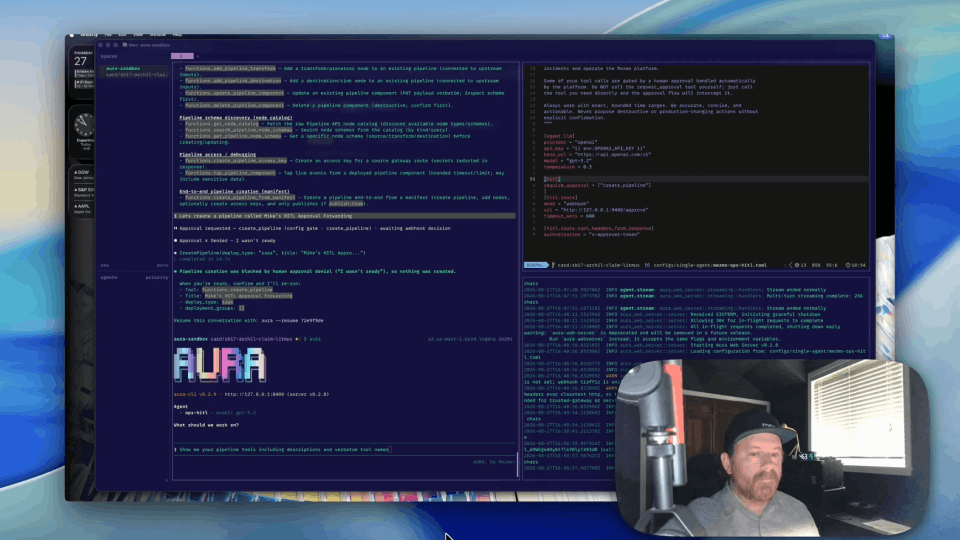
1:09 Let's see what it looks like when we just run the standard aura init config. Notice that we only have the three workers that come from the init: the incident-responder, log-analyst, and metric-analyst.
Let's see what happens if we ask AURA a question that you may have at 2 or 3 in the morning if you're an on-call engineer. So you've just been woken up and you're paged because your storefront web deployment is crashing in your web server namespace. Let's see what we get with this config.
Why the baseline answer is generic
1:58 Notice that it doesn't go to any of those workers that we configured, because it's not told to do so. We did get an answer, but this answer is coming from the coordinator, because it passed our query to an LLM, and it came from generic knowledge, nothing specific to how we work in our company.
Runbook config: worker, routing rules, and sources of truth
2:20 I've written another config file that's based off of the standard AURA config. Let's see what it looks like once we add in our runbook-specific information.
On the left, we have our standard config file, and on the right, we have our additions. The first thing we've added here is the runbook-reader to the list of workers that the coordinator will know about. Then we've given it some mandatory routing rules, because if something looks like it needs to have a runbook associated with it, then we want it to be routed to the runbook-reader.
Define what sources of truth we have, how complete the answer needs to be, and the process for looking up the runbook during an incident.
Wiring the Notion MCP server
3:13 We've configured our MCP server for Notion. We're going to use the Docker version of the MCP for this demonstration. And here's where we reference that token that's in our .env file.
Scoping tools per worker
3:29 For the workers that pre-existed, we're going to set an empty list for the MCP filter. This is the tool list that the worker will have access to. Setting an empty list here means that it won't have access to our Notion tools that we're going to use later. We'll do that for all three of these.
Further down, we've got the runbook-reader configured with its tools that come from the Notion MCP. And then we give it our prompt that we want to use for how to read a runbook, what to return, and then the rules for how to utilize those runbooks.
A cheaper model for runbook retrieval
4:13 In this section right here, we're going to configure the use of GPT-5 mini, because we don't need an expensive LLM to be able to read documentation out of a runbook database.
Same prompt with the runbook reader enabled
4:30 Let's fire up AURA with that config. And you notice that we have our three original workers, but we have our new runbook-reader worker.
If we give it the exact same question again, no changes at all, we'll see what we get this time. Notice it's already been passed to the runbook-reader worker, and it's going to begin to query Notion to get information. And it's already found our CrashLoopBackOff document.
What the runbook-backed answer contains
5:54 Now we have our answer, and we can see it's a much more in-depth answer that's being fed by the runbook that we've already defined in Notion. Our steps are in order, and we have all of our details. We have a link to the Notion runbook so we can go check things ourselves.
We have our metadata that was in the runbook, including things like when it was last validated, so we can know that this is a current runbook. We even see things that are specific to us, like who to escalate to if things aren't going as well as you would hope they would be.
Things that come from external to our runbook are clearly denoted. These will be commands that are coming from what the coordinator can get, or what the runbook-reader, in this case, can get from the LLM itself. It's a much more complete and user-specific answer from AURA in this case.
One token, one config, no code
7:07 One token, one config, no code, and your runbook stays in Notion where your team's already stored them.
If your team, instead, chooses to keep their runbooks in the Git repo, we've got another video detailing how to set that up. Thanks for watching.
More videos