Why AURA Scratchpad Is Rad: Bound Your Agent Context Window
A big tool result does not have to be a big context cost. AURA moves it to disk and hands the model a pointer plus the tools to navigate what is there.
- Learn more about AURA → https://www.mezmo.com/aura
- Get started today → https://github.com/mezmo/aura
- Get deployment help→ https://www.mezmo.com/contact
- Scratchpad docs → https://docs.mezmo.com/aura/scratchpad
A large MCP tool result can consume or overflow an agent's context window, and on a third-party server you do not control how much comes back. Scratchpad breaks the link between how big a tool result is and how much context it costs: the full output goes to disk, and only the slice the model asks for ever enters the window. Errors always pass through inline, so the model can react to them.
Every tool result is token counted with the tokenizer matched to your model, and interception fires at the threshold you set for that tool. Eight structure-aware exploration tools do the reading: schema maps keys and types to line ranges, item_schema finds every field across an array, iterate_over works like a select statement over the items, and get_in, grep, head, and slice handle targeted extraction. A large markdown report buried inside a JSON string is pulled into its own companion file, with sections mapped to line ranges the model can slice.
Extraction is capped too. Every request is token counted against a per-call cap and the remaining window before it runs, and an oversized one is refused with suggestions to narrow the range, paginate, or request fewer fields. That costs one turn instead of a guessing spiral.
Setup is two additions to your TOML: enabled = true under agent.scratchpad, and per-tool thresholds on the MCP server. Thresholds are glob patterns and the most specific one wins. Turn it on for tools that can return unbounded output, such as log queries and list-everything endpoints, and skip small bounded tools where interception is pure overhead. AURA reports tokens intercepted versus tokens extracted in the CLI and emits token usage in SSE events.
AURA Scratchpad is built for SRE and platform engineers who need an agent to work against MCP servers they do not control, without a single oversized tool result deciding how much context is left.
The demo at the end runs a root cause analysis over the last five minutes to show Scratchpad working, not to reach a finding: no cause is named on camera, and AURA reports rather than acts in this video. What it does show is thousands of tokens intercepted on one run, with the speaker noting that not every run reduces consumption that sharply.
0:00 Why a big tool result costs the context window
0:13 What Scratchpad does
0:30 Token counting and per-tool thresholds
0:48 Eight structure-aware exploration tools
1:12 Structured strings become companion files
1:27 Capping extraction against the context budget
1:48 Tokenizer support by provider
1:58 Which tools to enable it on
2:17 Tokens intercepted versus tokens extracted
2:30 Two additions to your TOML
2:44 Running it live
3:19 What a typical run looks like
3:33 Recap
#AISREAgent #ContextEngineering #PlatformEngineering
Transcript
Why a big tool result costs the context window
0:00 Your AI agent just called a tool and got back 80,000 tokens. There goes the context window. Unless you have Scratchpad. This is 31 Days of AURA. Why is Scratchpad rad?
What Scratchpad does
0:13 Scratchpad breaks the link between how big a tool result is and how much context it costs. Your MCP tool returns something huge. AURA saves the full output to disk and hands the model a small pointer instead. Only the relevant slice ever enters the context window.
Token counting and per-tool thresholds
0:30 AURA counts every tool result in real tokens with the tokenizer matched to your model. Over the threshold you set for that tool, the output is written to a scratchpad file and the model gets a dozen-line pointer. Errors always pass through inline, so the model can react.
Eight structure-aware exploration tools
0:48 How does it find anything? There are eight exploration tools and they're structure aware. schema maps the keys and types to line ranges. item_schema finds every field across an array. iterate_over is basically a select statement over the items, plus get_in, grep, head, and slice. Schema first, then targeted extraction. The model navigates the data like an engineer, not a novel reader.
Structured strings become companion files
1:12 What about a giant markdown report buried inside a JSON string? Handled automatically. Large structured strings are extracted into companion files. That markdown becomes its own file, with sections mapped to line ranges the model can slice.
Capping extraction against the context budget
1:27 And what stops the model from just reading the whole thing? Back in the context budget, every extraction is token counted first against a per-call cap and the remaining window. Too big, the tool refuses with suggestions like narrow the range, paginate, and request fewer fields. One turn lost, not a guessing spiral.
Tokenizer support by provider
1:48 This works on every provider. Exact tokenizers for OpenAI and Gemini, a calibrated approximation for Claude, and a safe fallback for everything else.
Which tools to enable it on
1:58 Should you turn it on for everything? Turn it on for any tool that can return unbounded output. Log queries, list everything endpoints. Skip small bounded tools; interception there is pure overhead, since each exploration costs an extra turn. Thresholds are per-tool glob patterns. Most specific wins.
Tokens intercepted versus tokens extracted
2:17 You'll know it's working. AURA reports tokens intercepted versus tokens extracted in the CLI. That ratio is your savings. It also outputs token usage in SSE events. Let's see it live.
Two additions to your TOML
2:30 Setup is two additions to your TOML: enabled = true under agent.scratchpad, and per-tool thresholds on the MCP server. Everything else has sane defaults. You just need a memory directory and a context window.
Running it live
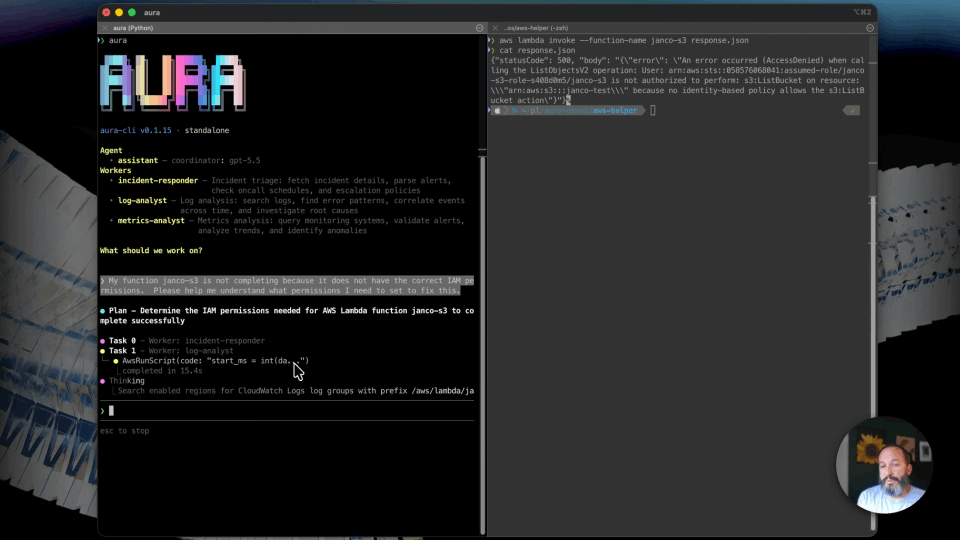
2:44 Now let's launch AURA and see it in action. Once AURA is launched, we're going to ask to run a root cause analysis over the last five minutes. As you'll notice, tool calls are being made and scratchpad files are being written. We're intercepting the results of those tool calls and extracting only the relevant bits that we need to put into our context. After we're finished with our root cause analysis, we've extracted just what we needed and intercepted thousands of tokens.
What a typical run looks like
3:19 Not every run is going to result in such drastic reductions of token consumption, but you'll have some peace of mind that context window will never overflow and that your agents will be able to keep on working no matter how big a result is from a tool call.
Recap
3:33 That's why Scratchpad is rad. Big data stays on disk. The model reads like an engineer. Overflow is impossible. For more information, visit docs.mezmo.com/aura/scratchpad. See you tomorrow.
More videos