Install AURA: debug incidents with an open-source SRE agent
You do not have to know the environment, and neither does the agent. Install AURA, add one MCP server, ask a question, and get a root cause back.
- Learn more about AURA → https://www.mezmo.com/aura
- Get started today → https://github.com/mezmo/aura
- Get deployment help → https://www.mezmo.com/contact
AURA is a fully open-source agentic harness built for SRE and production operations work. In this walkthrough, Mezmo forward deployed engineer Jeff installs AURA on a local desktop, runs aura init to generate the config and connect it to an Anthropic Sonnet model, then wires in a Grafana MCP server pointed at his homelab. He hands AURA a live incident: a set of addressable LED lights that stopped responding to Home Assistant. The coordinator agent dispatches its incident response, metrics, and log analysis workers through MCP and returns a root cause analysis, a service stuck in a crash loop against a locked or corrupted SQLite database, with an unclean shutdown as the likely trigger and recommended remediation actions. No Grafana login, and no prior knowledge of the environment.
AURA is built for SREs and platform engineers who need agentic incident investigation they can inspect and own, without handing production access to a third-party black box.
Install options covered: Homebrew binaries for standalone copilot use, Docker Hub containers, and headless mode for CI pipeline integration.
- 00:00 What AURA is and where to get it
- 00:14 Why the harness is open source and team-owned
- 01:17 Install paths: Homebrew, Docker Hub, headless CI
- 01:41 Running
aura initand connecting an LLM - 02:06 Inside the config: coordinator agent and workers
- 02:43 Adding a Grafana MCP server
- 02:56 Smoke test: verifying LLM and MCP wiring
- 03:33 The incident: LED lights unresponsive in Home Assistant
- 04:13 Root cause analysis: crash loop and locked SQLite database
- 04:49 Why this worked with zero environment knowledge
- 05:09 What's next: guided remediation, human in the loop, governance
Coming next: guided remediation, human-in-the-loop automated remediation,
and governance policies that define when and where AURA can act without a
human in the loop.
#OpenSourceSRE #AIOps #SRE
Walkthrough
This guide shows you how to install AURA on your local machine and use it to perform a Root Cause Analysis (RCA) on running infrastructure.
Prerequisites
- Homebrew: For macOS or Linux.
- LLM API Key: Anthropic (used in this guide), OpenAI, or a local provider like Ollama.
- Infrastructure / services logging to a central location: In this example we are using Grafana.
- Docker Desktop: Required if you are running your MCP servers (like the Grafana toolset) in containers.
Step-by-Step Guide
1. Install the AURA CLI
AURA is available via the Mezmo Homebrew tap (additional installation options in AURA documentation). Run the following to install the binary:
brew install mezmo/tap/aura2. Initialize your Environment
Run the initialization command to generate your config and connect your LLM.
aura initFollow the prompts to:
- Choose a Provider: Select your LLM (e.g., Anthropic).
- Set API Key: Input your key or confirm the detected environment variable.
- Pick a Model: Choose your preferred model (e.g., claude-5-5-sonnet).
3. Connect AURA to your Stack (MCP)
To give AURA "eyes" on your environment, you need to add an MCP server. In this example, we’ll add a Grafana server running locally in Docker.
The easiest way to configure an MCP server is by starting aura, and running the command /mcp
Alternatively, you can manually add MCP servers and tune their configuration:
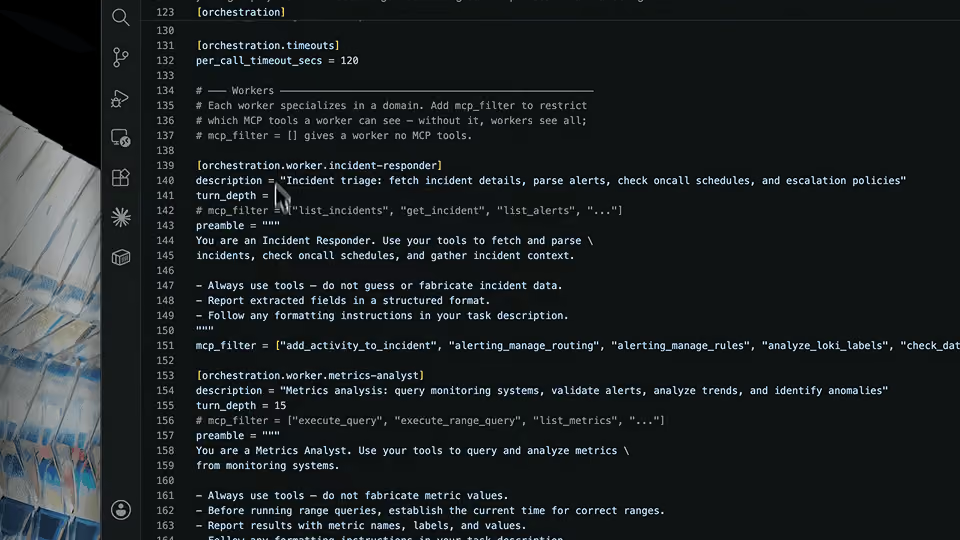
Open your config.toml (usually in ~/.config/aura/) and add your server details:
[mcp.servers.grafana]transport = "stdio"
cmd = ["docker"]
args = ["mcp", "gateway", "run", "--profile", "homelab"]
description = "Grafana MCP over Docker Desktop MCP Toolkit"
Note: While this example uses Grafana, AURA connects to any platform with an MCP server (e.g., Prometheus, Elastic, or local log files). To find the specific configuration for your unique observability tool, refer to the AURA MCP Documentation.
4. Run your first RCA
Start the AURA cli:
auraOnce inside, you can ask AURA to investigate a real-world failure. For example, if your smart lights stop responding in Home Assistant:
Prompt: "Can you use Grafana to give me an RCA on why my Govee lights are no longer controllable with Home Assistant?"
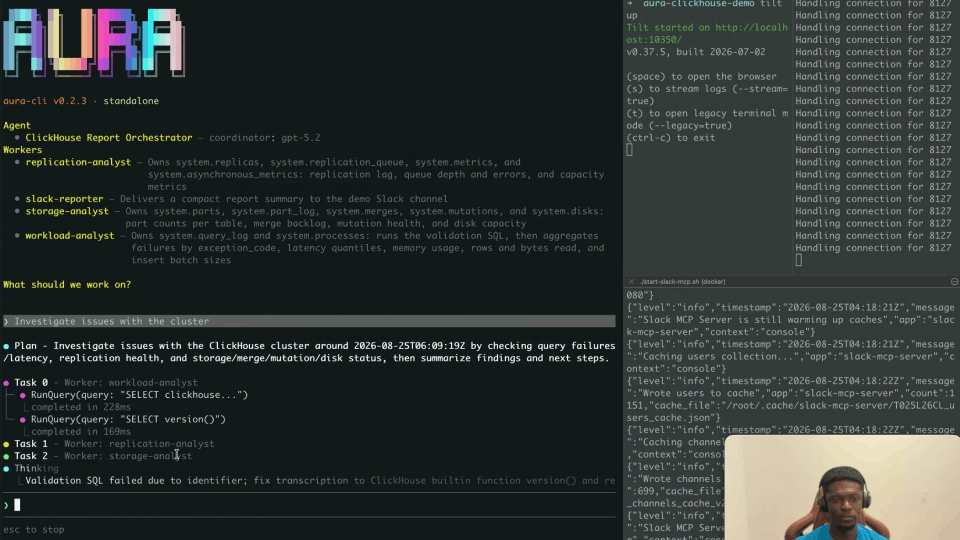
AURA will coordinate its specialized workers—metrics-analyst and log-analyst—to query your Grafana instance, correlate the logs, and provide a structured breakdown of the crash loop and the specific database error causing the fault.
Next Steps & Docs
Ready to build your own custom workers or add more tools? Check out the AURA Quickstart Guide on GitHub for more advanced configurations.
Transcript
What is AURA
(00:00) Hi, I'm Jeff. I'm a forward deployed engineer here at Mezmo. Today I'm going to install AURA on my local desktop, and we're going to troubleshoot an issue in my homelab environment.
AURA is a fully open-source agentic harness that we built specifically for SRE and production operations work. You can find AURA on GitHub at https://github.com/mezmo/aura.
Why the Harness Is Open Source
(00:14) We've made this an open-source project because we believe that introducing agents to the sacred environment that is SRE and production should not be something that gets outsourced to third-party black-box providers.
The harness defines your workers and enables them to do tasks like investigations, response and remediation, and maintenance work. That should be transparent, it should be fully inspectable, and most importantly, it should be fully owned by the teams who operate it.
Our plan is to keep the harness open to anyone, from hobbyists to Google scale, and not make it dependent on any commercial features we offer in the future.
Installation Options
(01:17) We ship binaries on Homebrew if you want to run AURA as a standalone copilot. We also have customers running AURA in headless mode, integrated into their CI pipelines, and we have containers on Docker Hub.
Running aura init
(01:41) After you install AURA on your machine, the next step is to run aura init. That creates a configuration file and gets AURA connected to your LLM. I'm going to use Anthropic. I already have an API key ready, and I'm going to pick the default Sonnet model. That's it, the configuration file is generated.
Inside the Config: Coordinator and Workers
(02:06) The next step is to add an MCP server to the config so that we can actually use AURA to talk to our systems of record.
In the configuration file, we have a system prompt that tells the coordinator agent that it is in an SRE role. Then we define a few different workers underneath. We have a basic template for incident response, metrics, and log analysis.
Adding a Grafana MCP Server
(02:43) I'm going to put my Grafana MCP server in here. It's running on the desktop and configured to talk to the Grafana instance in my homelab. That's it.
Smoke Test
(02:56) Now we're going to run AURA and do a quick smoke test. This exercises the connection to our LLM provider and verifies that our MCP server is set up correctly. I see a bunch of tools, so I know everything's wired.
The Incident
(03:33) Now we're going to prompt AURA to investigate an issue. The issue we're going to look at today is a real one that I'm actually having right now: I have a brand of addressable LED lights, and they are no longer controllable with Home Assistant.
All of the different services in my homelab log to the same Grafana instance. AURA is going to start invoking those workers and talking through my MCP server to try to discover what's going on.
Root Cause Analysis
(04:48) It looks like it finished, so we have our root cause analysis here. We actually had an issue with our MCP server, but despite that, we were able to identify a service that is in a crash loop state. Specifically, we found a related error involving a read-only database.
Our root cause assessment indicates either a corrupted or locked SQLite database. We have a likely trigger, probably an unclean shutdown, and then some recommended actions.
Why This Worked
(05:24) With that, all we had to do was get AURA installed, add our MCP server, and ask a question. I never had to log in to Grafana. I don't have to know anything about my environment, AURA doesn't know anything about my environment, and yet it was still able to identify a likely trigger and root cause of this incident.
What's Next
(05:44) Next steps would be actually remediating this, and we'll have videos out for this as well. AURA can be used for guided remediation, or human-in-the-loop automated remediation.
We also have some capabilities coming down the line around governance that allow very specific policies on when and where AURA can take action without that human in the loop. So stay tuned for additional content coming down the line. And more importantly, give it a try and give us your feedback. Thank you.
More videos