Log Management Compliance for Saas Applications

Ask about this page
Perplexity
Grok

If you offer a SaaS application, meeting the American Institute of Certified Public Accountants (AICPA) SOC 2 auditing requirements and Payment Card Industry Data Security Standard (PCI-DSS) compliance rules is critical for avoiding compliance or data privacy pitfalls. These requirements add another layer of complexity to your software management process, but they can be met if you have the right logging solution in place.

To explore how, let's look at how logging, SOC 2 auditing, and PCI-DSS compliance go hand-in-hand for any company that offers a SaaS application.

SaaS, SOC 2, and PCI-DSS

An application that is delivered using the Software-as-a-Service, or SaaS, model means that the application runs on the software provider's servers, and users access it remotely over the Internet. If the SaaS application collects any data about users that is potentially personal or private in any way, that data ends up being stored on the software provider's servers due to the architectural nature of SaaS.

As a result, most companies that deploy SaaS applications are subject to certain reporting and compliance requirements involving that personal data. Chief among those requirements is the SOC 2 audit report, an auditing process by which software providers must prove that they meet certain requirements when working with users' data.

SOC 2 report addresses a service organization’s controls that relate to operations and compliance, as outlined by the AICPA’s Trust Services criteria in relation to availability, security, processing integrity, confidentiality and privacy. A service organization may choose a SOC 2 report that focuses on any one or all five Trust Service principles and may choose either a Type I or a Type II audit. SOC 2 is not a compliance regulation per se, but the ability to produce SOC 2 reports is a critical step for proving to regulators, customers, and other stakeholders that your company follows basic best practices when working with sensitive data.

Along similar lines, the Payment Card Industry Data Security Standard, or PCI-DSS, is a standard that defines various rules that you must meet if you process payments in an application using any mainstream digital payment platform (such as a credit card). PCI-DSS is designed to protect the security of payment data (like credit card numbers).

These frameworks rely heavily on security logs for compliance and auditing, forming the backbone of modern observability.

In short, then, any SaaS application that collects data that may be considered personal, or that is associated with digital payments, must meet certain requirements defined by SOC2 and PCI-DSS.

To be clear, those rules apply to various other types of applications too; they're not focused just on SaaS applications. But because SaaS applications by definition store user data on servers that are not controlled by users themselves, they present compliance challenges that would not necessarily occur in the context of applications that run locally and keep user data on users' personal devices.

How Logging Helps Meet SOC 2 and PCI-DSS Requirements

Having a logging solution in place is not a specific requirement of either SOC 2 or PCI-DSS. However, it would be very hard to meet SOC 2 and PCI-DSS rules without the visibility and management features that centralized logging provides.

Centralized log management solutions help meet SOC 2 and PCI-DSS requirements in several ways. Although the two sets of rules are different in many ways, any team that wants to address them efficiently requires centralized logging.

Identifying and Alerting on Suspicious Activity

The security category of SOC 2, as well as PCI-DSS requirements 10.6 and 10.8, mandate that organizations be able to identify and react to attempts to gain unauthorized access to protected data.

Logs alone may not guarantee that you can achieve these goals – SIEM platforms, firewalls, and various other security tools are also important resources – but logs (especially authentication and access logs) do ensure that you have a way to gain comprehensive and systematic visibility into any abuse attempts on your SaaS application or the infrastructure that hosts it. The ability to centralize your logs and scan them for security-related events also enables you to generate reports that prove you handled security issues appropriately. Without logs, you would have no way to demonstrate your reaction to security intrusions.

Protecting Data Access

In addition to rules involving unauthorized access attempts, SOC 2 and (especially) PCI-DSS include provisions regarding how legitimate stakeholders (such as your employees or partners) access and use sensitive data.

The main requirement here (spelled out in PCI-DSS requirement 12, and more generally in the SOC 2 data availability and integrity rule) is that you need to have a policy in place to govern how legitimate access requests are handled. They don't dictate exactly what your policy entails, but they require you to have reasonable controls in place.

Logging won't enable those controls, but it does provide the visibility you need to guarantee (and to demonstrate to auditors) that they are being followed. You don't want to wait for an external auditor to discover that your employees are not abiding by the rules you lay out regarding the management of payment processing information or customers' personal data. You want to be able to use logs to identify issues of non-compliance yourself, before they turn into broader problems with external auditors or become known publicly and harm your reputation.

Securing Sensitive Data in Logs

Generally speaking, logs don't contain user or payment data. But there is always a chance that sensitive data like this may be stored inside a log accidentally. In that case, having the ability to scan all logs for strings that look like credit card numbers or personal names is a powerful way to remove sensitive information from logs (as well as identify the source that placed the data in the logs in the first place) so that you can prevent sensitive information from being logged on a continual basis.

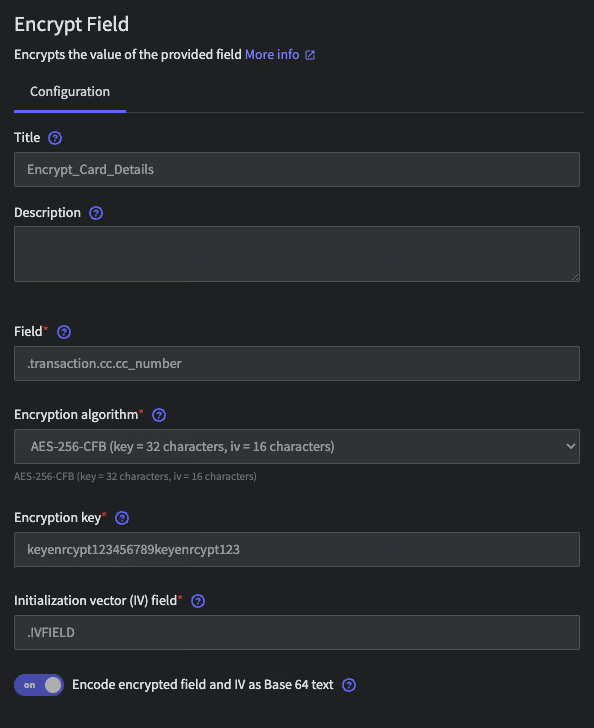
Alternatively, if for some reason you need to store sensitive data inside logs, the ability to aggregate all logs into a central location makes it easy to encrypt the logs and protect or transform sensitive data inside them (which means, for example, replacing data like credit card numbers with an alternative string of data in order to "mask" the credit card number). Steps like these, which would be impossible to perform efficiently if your log data is spread across your infrastructure and cannot be easily centralized, are particularly important for meeting PCI-DSS requirement 3.

Enabling Audits at Any Time

A key underlying principle of both SOC 2 and PCI-DSS is that organizations should be able to demonstrate that they are following data protection best practices continuously, not just when it's time to do an audit.

Logs are the only way to demonstrate this kind of ongoing compliance. An audit report prepared at a single point in time demonstrates that you were compliant at that particular moment, but if you want to show that you were continuously compliant, you need the ability to gather and search through logging data stretching back into the past.

Likewise, the ability to rotate and securely archive logs is essential for ensuring that you have the historical log data that you need to demonstrate compliance at a certain point in the past. Without proper log management in place, you run the risk that older logs may be deleted or overwritten, depriving you of visibility into the past.

How to Build a Log Management Compliance Solution

There are two basic ways to go about implementing a log management solution that empowers you to leverage logs effectively for meeting SaaS compliance requirements.

DIY Logging Using Open Source Tools

The first is to build your own solution based on various tools that let you aggregate and analyze log data. The ELK stack, which is based on open source tools, is a common approach.

This strategy may work well enough if you have only a small amount of sensitive data to manage, or if you have the extensive in-house development resources required to extend your open source logging tools with compliance features that they don't include by default. However, for full-scale, streamlined compliance needs, solutions like the ELK stack come up short. Without custom changes, they usually don't guarantee the visibility you need to manage all compliance requirements for a SaaS application.

They also introduce the risk that the logging software itself is not compliant with whichever rules you need to meet – a common challenge when using open source tools, which typically are not certified by external auditors to meet compliance requirements.

Turnkey, Compliant Logging

Alternatively, you can use a log management solution like Mezmo, formerly known as LogDNA. Mezmo not only provides the features you need to gain holistic visibility into sensitive data within your applications without extensive configuration or customization, it also provides a SaaS logging solution that is compliant with all major compliance frameworks.

That means that, when you use Mezmo to manage your logs, you can be confident that Mezmo's own software and servers store and process logs in ways that protect the privacy of your users and help you meet SOC 2 and PCI-DSS rules.

Table of contents

    More articles

    How to Reduce Log Volume Without Losing Visibility
    How to Reduce Log Volume Without Losing Visibility
    Log Management
    What Is Log Rehydration? Understanding the Process and Benefits
    What Is Log Rehydration? Understanding the Process and Benefits
    Log Management
    Log Metrics: What are they? How can they be used? What insights can be garnered at scale?
    Log Metrics: What are they? How can they be used? What insights can be garnered at scale?
    Log Management
    What is MultiCloud Monitoring & Management?
    What is MultiCloud Monitoring & Management?
    Log Management
    Live Tail: What It Is, Why It’s Useful, How To Use It
    Live Tail: What It Is, Why It’s Useful, How To Use It
    Log Management
    Log Data: What it is and why it matters
    Log Data: What it is and why it matters
    Log Management
    Istio Logging 101
    Istio Logging 101
    Log Management
    How to Use JSON Logs
    How to Use JSON Logs
    Log Management
    Understanding and Leveraging AWS Cloudwatch Logs
    Understanding and Leveraging AWS Cloudwatch Logs
    Log Management
    What Is a Tail Log?
    What Is a Tail Log?
    Log Management
    How to Use S3 Access Logs
    How to Use S3 Access Logs
    Log Management
    Benefits of Data Logging
    Benefits of Data Logging
    Log Management
    What is Real-time Log Monitoring?
    What is Real-time Log Monitoring?
    Log Management
    Managing Digital Compliance During Digital Transformation
    Managing Digital Compliance During Digital Transformation
    Log Management
    A Comprehensive Guide to Kubernetes Monitoring Tools
    A Comprehensive Guide to Kubernetes Monitoring Tools
    Log Management
    The Role of Infrastructure Monitoring in DevOps
    The Role of Infrastructure Monitoring in DevOps
    Log Management
    5 Practical Ways to Build a Secure CI/CD Pipeline
    5 Practical Ways to Build a Secure CI/CD Pipeline
    Log Management
    Why and How to Analyze Deployment Health Through CI/CD Logs
    Why and How to Analyze Deployment Health Through CI/CD Logs
    Log Management
    What is Application Lifecycle Management
    What is Application Lifecycle Management
    Log Management
    What Is A Real-Time Dashboard?
    What Is A Real-Time Dashboard?
    Log Management
    Log Indexing and Rotation for Optimized Archival
    Log Indexing and Rotation for Optimized Archival
    Log Management
    What is Log Rotation? How Does it Work?
    What is Log Rotation? How Does it Work?
    Log Management
    Logging for Application Security
    Logging for Application Security
    Log Management
    How Do You Manage Logs?
    How Do You Manage Logs?
    Log Management
    How Custom Parsing Can Boost Developer Productivity
    How Custom Parsing Can Boost Developer Productivity
    Log Management
    7 Best Practices for Log Management and Analytics
    7 Best Practices for Log Management and Analytics
    Log Management
    Enhancing Communication Across Your Teams With Logging
    Enhancing Communication Across Your Teams With Logging
    Log Management
    Which Log Files Should Users Onboard to Build an Observability Platform?
    Which Log Files Should Users Onboard to Build an Observability Platform?
    Log Management
    What Information Does Log Aggregation Capture?
    What Information Does Log Aggregation Capture?
    Log Management
    The Key Benefits of Log Data
    The Key Benefits of Log Data
    Log Management
    Planning Your Log Collection
    Planning Your Log Collection
    Log Management
    Capturing the Most Critical Information Within Your Logs
    Capturing the Most Critical Information Within Your Logs
    Log Management
    The Importance of Data Privacy and Confidentiality for Log Management
    The Importance of Data Privacy and Confidentiality for Log Management
    Log Management
    SOC 2 and its Benefits
    SOC 2 and its Benefits
    Log Management
    Logging for Microservices
    Logging for Microservices
    Log Management
    System Logging Best Practices
    System Logging Best Practices
    Log Management
    Why HIPAA and Compliance Matters to Logging
    Why HIPAA and Compliance Matters to Logging
    Log Management
    Application Security and Compliance through Logging
    Application Security and Compliance through Logging
    Log Management
    What is Log Aggregation? Log Aggregation Explained
    What is Log Aggregation? Log Aggregation Explained
    Log Management
    What is Log Analysis?
    What is Log Analysis?
    Log Management
    What to Look for in a HIPAA-Compliant Log Management Tool
    What to Look for in a HIPAA-Compliant Log Management Tool
    Log Management
    What is Structured Logging?
    What is Structured Logging?
    Log Management
    Why Is Log Management Important?
    Why Is Log Management Important?
    Log Management
    Top Use Cases for Log Analysis
    Top Use Cases for Log Analysis
    Log Management