Introducing LogDNA Agent 3.4

4 MIN READ
MIN READ

LogDNA is now Mezmo but the product you know and love is here to stay.

In our ongoing efforts to provide our customers with a best-in-class log management solution, we’re excited to launch improvements to our Agent. This new, robust version (3.4) provides significant performance improvements for our customers. Specifically, we focused on two main areas of the Agent: error handling and endurance.

Error Handling

One area of focus for Agent 3.4 is our ability to better handle error states and ensure you are optimizing performance. Specifically, we wanted to eliminate noisy error logs as well as give customers more control over their retry files. With Agent 3.4 we’ve implemented:

  • Longer backoff for HTTP 5XX errors
  • Immediate exiting on HTTP 4XX errors
  • Recovery on notify errors
  • Configurable retry file locations
  • Maximum retry file sizes
  • Additional retry metrics
  • Compressed retry files

Endurance

We also focused our efforts on improving the Agent’s endurance. Specifically, we implemented:

  • HTTP 2.0 support
  • Concurrent uploads

The agent was enhanced to support tracking non-contiguous offsets, which allowed for concurrent uploads to be re-enabled without sacrificing stateful lookback.

Performance Data

As excited as we are for customers to try out this new Agent version and see these improvements for themselves, we know that we are only as good as the data we measure. Because of the focus on performance, we decided to share some of the data and metrics from our own internal testing.  To help you understand the nature of this data, I have included a helpful glossary in the Appendix below.

Benchmark Testing

The goal of benchmark testing is to simulate the Agent under expected conditions. We ran benchmark tests on an EC2 instance in the us-west-1 region with the following specifications:

Instance Type: t2.large

Architecture: x86_64

Processor: Intel(R) Xeon(R) CPU E5-2676 v3 @ 2.40GH

Number of Cores: 2

Memory: 8 GB

Storage: EBS

And here were the results of the test:

File System Metrics

Total Time (sec): 23

Total Lines: 4166932

Line Rate (lines/sec): 181170.95652173914

Total Size (bytes): 52245566.0

File Rate (bytes/sec): 2271546.347826087

Ingestion Metrics

Total Time (sec): 22

Total Size (bytes): 310600357.0

Total Number of Samples: 149

Average Request Duration (sec): 1.0604503484161074

Average Request Size (bytes): 2084566.1543624161

Endurance Testing

The goal here is to test the LogDNA Agent for an extended period under a pseudo-realistic workload. The following endurance test was run on an EC2 instance for 72 hours with the following specifications in the us-east-2 region:

Instance Type: m5d.large

Architecture: x86_64

Processor: Intel(R) Xeon(R) CPU E5-2676 v3 @ 2.40GH

Number of Cores: 2

Memory: 8 GB

Storage: EBS

Memory Consumption:

In these conditions, the logdna-agent consumed around 46 MB VmRSS, which measures how much RAM the process is actually using. 

CPU Consumption:

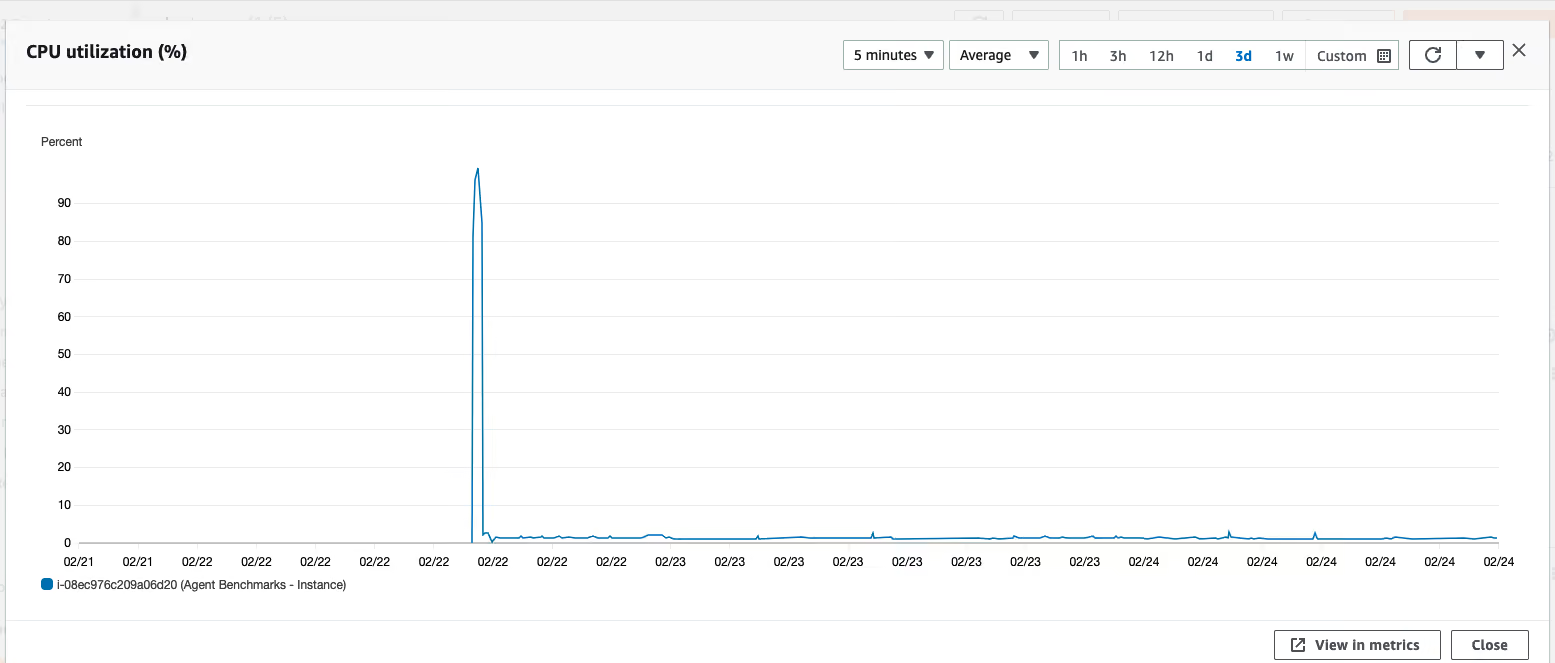
Outside of the initial program start (which is reflected in the spike in the graph below, and is expected), the Agent consumed less than 2% of CPU throughout the entire endurance test. 
In summary, Agent 3.4 performs well under heavy load for a long period of time and in error states that require some form of recovery. Please check out our documentation for further details. And as always, feel free to reach out to me with any questions: albert.feng@logdna.com

Appendix

Definitions:

File System Metrics

  • Total Time: the time of the benchmark run in seconds.
  • Total Lines: the total number of lines read off the file system by the agent, while the benchmark process was run.
  • Line Rate: the number file lines per second read by the agent. Calculated as (total lines)/(total time)
  • Total Size: the total amount of log data, in bytes, consumed by the agent.
  • File Rate: the rate, in bytes per second, of log data being consumed by the agent. Calculated as (total size)/(total time)

Ingestion Metrics

  • Total Time: same as defined above
  • Total Size: The total amount of data sent via HTTP request to the Ingester.
  • Total Number of Samples: The amount of samples taken by the metrics recorder during the benchmark run.
  • Average Request Duration: the average duration of an HTTP call to the Ingester over the duration of the benchmark run. It is calculated as (total number of seconds spent sending HTTP requests to the ingester)/(total number of ingestion samples taken)
  • Average Request Size: the average size of an HTTP request sent to the Ingester over the duration of the benchmark run. Calculated as (sum of all bytes sent to the ingester)/(total number of ingestion samples taken)

Memory Metrics

Max Process Virtual Memory: the maximum process virtual memory observed throughout the benchmark process run.

Table of Contents

    Share Article

    RSS Feed

    Next blog post
    You're viewing our latest blog post.
    Previous blog post
    You're viewing our oldest blog post.
    Mezmo + Catchpoint deliver observability SREs can rely on
    Mezmo’s AI-powered Site Reliability Engineering (SRE) agent for Root Cause Analysis (RCA)
    What is Active Telemetry
    Launching an agentic SRE for root cause analysis
    Paving the way for a new era: Mezmo's Active Telemetry
    The Answer to SRE Agent Failures: Context Engineering
    Empowering an MCP server with a telemetry pipeline
    The Debugging Bottleneck: A Manual Log-Sifting Expedition
    The Smartest Member of Your Developer Ecosystem: Introducing the Mezmo MCP Server
    Your New AI Assistant for a Smarter Workflow
    The Observability Problem Isn't Data Volume Anymore—It's Context
    Beyond the Pipeline: Data Isn't Oil, It's Power.
    The Platform Engineer's Playbook: Mastering OpenTelemetry & Compliance with Mezmo and Dynatrace
    From Alert to Answer in Seconds: Accelerating Incident Response in Dynatrace
    Taming Your Dynatrace Bill: How to Cut Observability Costs, Not Visibility
    Architecting for Value: A Playbook for Sustainable Observability
    How to Cut Observability Costs with Synthetic Monitoring and Responsive Pipelines
    Unlock Deeper Insights: Introducing GitLab Event Integration with Mezmo
    Introducing the New Mezmo Product Homepage
    The Inconvenient Truth About AI Ethics in Observability
    Observability's Moneyball Moment: How AI Is Changing the Game (Not Ending It)
    Do you Grok It?
    Top Five Reasons Telemetry Pipelines Should Be on Every Engineer’s Radar
    Is It a Cup or a Pot? Helping You Pinpoint the Problem—and Sleep Through the Night
    Smarter Telemetry Pipelines: The Key to Cutting Datadog Costs and Observability Chaos
    Why Datadog Falls Short for Log Management and What to Do Instead
    Telemetry for Modern Apps: Reducing MTTR with Smarter Signals
    Transforming Observability: Simpler, Smarter, and More Affordable Data Control
    Datadog: The Good, The Bad, The Costly
    Mezmo Recognized with 25 G2 Awards for Spring 2025
    Reducing Telemetry Toil with Rapid Pipelining
    Cut Costs, Not Insights:   A Practical Guide to Telemetry Data Optimization
    Webinar Recap: Telemetry Pipeline 101
    Petabyte Scale, Gigabyte Costs: Mezmo’s Evolution from ElasticSearch to Quickwit
    2024 Recap - Highlights of Mezmo’s product enhancements
    My Favorite Observability and DevOps Articles of 2024
    AWS re:Invent ‘24: Generative AI Observability, Platform Engineering, and 99.9995% Availability
    From Gartner IOCS 2024 Conference: AI, Observability Data, and Telemetry Pipelines
    Our team’s learnings from Kubecon: Use Exemplars, Configuring OTel, and OTTL cookbook
    How Mezmo Uses a Telemetry Pipeline to Handle Metrics, Part II
    Webinar Recap: 2024 DORA Report: Accelerate State of DevOps
    Kubecon ‘24 recap: Patent Trolls, OTel Lessons at Scale, and Principle Platform Abstractions
    Announcing Mezmo Flow: Build a Telemetry Pipeline in 15 minutes
    Key Takeaways from the 2024 DORA Report
    Webinar Recap | Telemetry Data Management: Tales from the Trenches
    What are SLOs/SLIs/SLAs?
    Webinar Recap | Next Gen Log Management: Maximize Log Value with Telemetry Pipelines
    Creating In-Stream Alerts for Telemetry Data
    Creating Re-Usable Components for Telemetry Pipelines
    Optimizing Data for Service Management Objective Monitoring
    More Value From Your Logs: Next Generation Log Management from Mezmo
    A Day in the Life of a Mezmo SRE
    Webinar Recap: Applying a Data Engineering Approach to Telemetry Data
    Dogfooding at Mezmo: How we used telemetry pipeline to reduce data volume
    Unlocking Business Insights with Telemetry Pipelines
    Why Your Telemetry (Observability) Pipelines Need to be Responsive
    How Data Profiling Can Reduce Burnout
    Data Optimization Technique: Route Data to Specialized Processing Chains
    Data Privacy Takeaways from Gartner Security & Risk Summit
    Mastering Telemetry Pipelines: Driving Compliance and Data Optimization
    A Recap of Gartner Security and Risk Summit: GenAI, Augmented Cybersecurity, Burnout
    Why Telemetry Pipelines Should Be A Part Of Your Compliance Strategy
    Pipeline Module: Event to Metric
    Telemetry Data Compliance Module
    OpenTelemetry: The Key To Unified Telemetry Data
    Data optimization technique: convert events to metrics
    What’s New With Mezmo: In-stream Alerting
    How Mezmo Used Telemetry Pipeline to Handle Metrics
    Webinar Recap: Mastering Telemetry Pipelines - A DevOps Lifecycle Approach to Data Management
    Open-source Telemetry Pipelines: An Overview
    SRECon Recap: Product Reliability, Burn Out, and more
    Webinar Recap: How to Manage Telemetry Data with Confidence
    Webinar Recap: Myths and Realities in Telemetry Data Handling
    Using Vector to Build a Telemetry Pipeline Solution
    Managing Telemetry Data Overflow in Kubernetes with Resource Quotas and Limits
    How To Optimize Telemetry Pipelines For Better Observability and Security
    Gartner IOCS Conference Recap: Monitoring and Observing Environments with Telemetry Pipelines
    AWS re:Invent 2023 highlights: Observability at Stripe, Capital One, and McDonald’s
    Webinar Recap: Best Practices for Observability Pipelines
    Introducing Responsive Pipelines from Mezmo
    My First KubeCon - Tales of the K8’s community, DE&I, sustainability, and OTel
    Modernize Telemetry Pipeline Management with Mezmo Pipeline as Code
    How To Profile and Optimize Telemetry Data: A Deep Dive
    Kubernetes Telemetry Data Optimization in Five Steps with Mezmo
    Introducing Mezmo Edge: A Secure Approach To Telemetry Data
    Understand Kubernetes Telemetry Data Immediately With Mezmo’s Welcome Pipeline
    Unearthing Gold: Deriving Metrics from Logs with Mezmo Telemetry Pipeline
    Webinar Recap: The Single Pane of Glass Myth
    Empower Observability Engineers: Enhance Engineering With Mezmo
    Webinar Recap: How to Get More Out of Your Log Data
    Unraveling the Log Data Explosion: New Market Research Shows Trends and Challenges
    Webinar Recap: Unlocking the Full Value of Telemetry Data
    Data-Driven Decision Making: Leveraging Metrics and Logs-to-Metrics Processors
    How To Configure The Mezmo Telemetry Pipeline
    Supercharge Elasticsearch Observability With Telemetry Pipelines
    Enhancing Grafana Observability With Telemetry Pipelines
    Optimizing Your Splunk Experience with Telemetry Pipelines
    Webinar Recap: Unlocking Business Performance with Telemetry Data
    Enhancing Datadog Observability with Telemetry Pipelines
    Transforming Your Data With Telemetry Pipelines